


Agility SEO
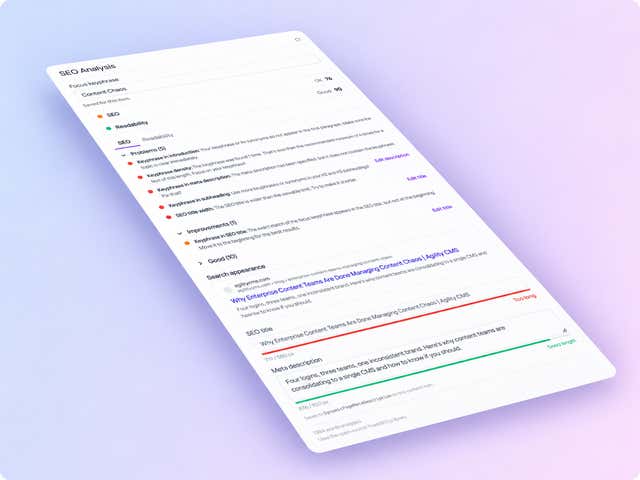
Score pages for SEO and readability while editors write them. Set a focus keyphrase and meta description in the sidebar, then fix what the analysis flags before you publish.
- Utilities
Fix the SEO before the page goes live
Most SEO tools tell you what's wrong after the page is live. The Agility SEO app scores the page while it's being written, using the page as your site actually renders it, including unpublished changes.
What you can do
- SEO and readability scores: findings come with plain-language advice and a colored status, green, orange or red.
- Focus keyphrase: set one to unlock the keyphrase checks, such as keyphrase in the title, introduction, subheadings and slug.
- Meta description in the sidebar: edit it without leaving the panel, and save it to the page's SEO settings or the item's meta description field.
- Pages and dynamic-page items: a sidebar on regular pages, and on content items such as blog posts and products in a dynamic page list.
- 22 languages: dedicated analysis follows the locale of the page you're editing, with a language-agnostic fallback for others.
Who it's for
Editors and content leads who own organic traffic, and developers who'd like SEO checks without adding a field to every model. It needs a website that renders Agility content and honors preview URLs. The analysis uses the open-source YoastSEO.js library and isn't affiliated with Yoast.
Install it from Settings → Apps. The docs explain the two optional settings and how scoring works.
Get started
- Open Apps In Agility, go to Settings → Apps. You need to be an administrator.
- Install the app Click Install, search for SEO Analysis, select it and click Continue.
- Set the optional values Optionally set the main content selector and a default analysis language, then click Next.
- Finish setup Click Finish setup. The panel appears in the sidebar of pages and dynamic-page items.
- Score a page Open a page or item, select SEO Analysis, set a focus keyphrase and review the findings.
Screenshots
Screenshot