

Why Traditional CMS Platforms Hold Back Growth
Traditional CMS platforms limit agility and innovation. Learn how a composable CMS built on Azure helps businesses scale faster and future-proof their digital experience.

Agility CMS
Canada's Original Headless CMS
The Digital Experience Bottleneck
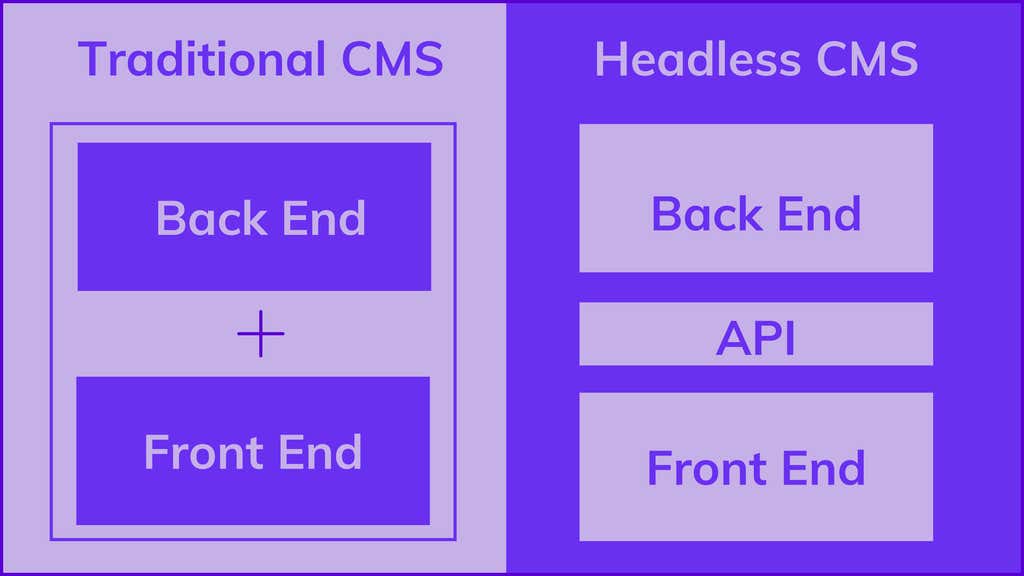
Traditional CMSs tightly couple your front-end, back-end, and content. That means simple changes ripple through your entire stack.
-
New landing page? Wait for a sprint.
-
Fresh campaign? Plugin conflicts.
-
Multisite update? Long release cycle.
It’s like rebuilding your whole house just to repaint a room.
Want a primer first? Read: What Is a Headless CMS?
How Legacy CMS Holds Teams Back
1) Slow Marketing Cycles
-
Marketers depend on devs for layout tweaks, components, and releases.
-
Campaign windows shrink while competitors go live faster.
2) Integration Friction
-
Outdated plugin ecosystems and limited APIs.
-
Hard to connect CRM, CDP, personalization, search, AI, or data tools you actually use.
3) Rising Maintenance Costs
-
Upgrades, patches, and hosting eat budget and focus.
-
Technical debt grows; innovation stalls.
In one line: Traditional CMS = control for IT. Composable CMS = speed for the business.
The Market Has Moved on - Have You?
Today, brands manage multiple sites, languages, and channels (web, apps, in-store screens, marketplaces, partner portals, and more). You need modular content, not page-bound blobs.
-
Launch faster across channels
-
Reuse components and content
-
Personalize without replatforming
Explore the trend: Composable Modularity: A Look at Gartner’s 2024 Predictions
The Hidden Cost of Staying Put
Delays aren’t just annoying—they’re expensive.
-
Missed campaign windows = lost revenue
-
Fragmented tech stack = duplicated content and effort
-
Blocked teams = lower output and morale
See what modern rollouts look like: Cineplex: A Composable Success Story
What a Composable CMS Changes (And Why it’s Easier)
A composable CMS uses APIs, modular content, and best-of-breed services that swap in and out as you grow.
-
Built for change: Each service evolves independently
-
Fast to ship: Editors publish instantly; developers iterate without bottlenecks
-
Flexible by design: Use your frameworks and front-ends (Next.js, React, etc.)
Deep dive: Headless API vs Traditional CMS APIs—What You Should Know
Why Agility CMS + Azure = Speed, Security, and Scale
Agility CMS is built to thrive in enterprise environments—powered by Microsoft Azure.
-
Enterprise-grade security & uptime
-
Global CDN performance
-
Compliance and governance
-
Dev stack your team already loves
Learn more: How Agility CMS Works with Azure Cloud
Or see the product: Agility Web Studio
Quick Checklist: Have You Outgrown Your CMS?
- If you check 3+, it’s time to consider composable.
- Editors wait on devs for routine con content/layout changes
- Your 'simple' site updates require deploys
- Plugin conflicts or version mismatches keep breaking things
- You're managing multiple sites/brands/locales with duplicated content
- You struggle to integrate CRM, search, analytics, or AI tools
- Campaigns regularly miss their ideal launch window
- Infra/security/upgrade time eats your dev budget
What This Looks Like in Practice
|
Task |
Traditional CMS |
Composable CMS (Agility) |
|
New campaign landing page |
Dev ticket → sprint → deploy |
Editor builds with reusable components → publish instantly |
|
Add personalization |
Plugin procurement, version risk |
Connect best-of-breed tools via APIs |
|
Launch a new locale |
Duplicate pages and plugins |
Reuse content models and translate cleanly |
|
Multisite governance |
One site breaks, all break |
Independent sites, centralized content control |
Explore how it all connects:


